> ## Documentation Index
> Fetch the complete documentation index at: https://hopsdocs.mintlify.site/llms.txt
> Use this file to discover all available pages before exploring further.
# Board meeting and fundraise prep
> Draft the board narrative from your data room and keep investor follow-ups moving.
Board meetings and fundraises run on the same material: metrics, milestones and a clean story. Hops reads your Drive data room, drafts the narrative in your deck order, and keeps a list of every investor follow-up so nothing goes quiet.
**How it runs:** Ask Hops, with a skill so the output has the same format every time. No automation needed.
## What it does
* **Reads the latest data room files.** Hops uses the newest decks and metrics in your board folder in Google Drive and Google Sheets.
* **Drafts the narrative in your deck order.** Highlights, metrics, product, team, risks and asks, with every number tied to a source file.
* **Tracks investor follow-ups.** Hops reads investor threads in Gmail and lists last contact, next step and owner for each investor.
* **Flags quiet investors.** Anyone with no reply in 7 days is listed, with a drafted nudge for each.
* **Keeps the date in view.** Hops checks Google Calendar for the board date so the draft reflects how much time is left.
 ## Ask Hops
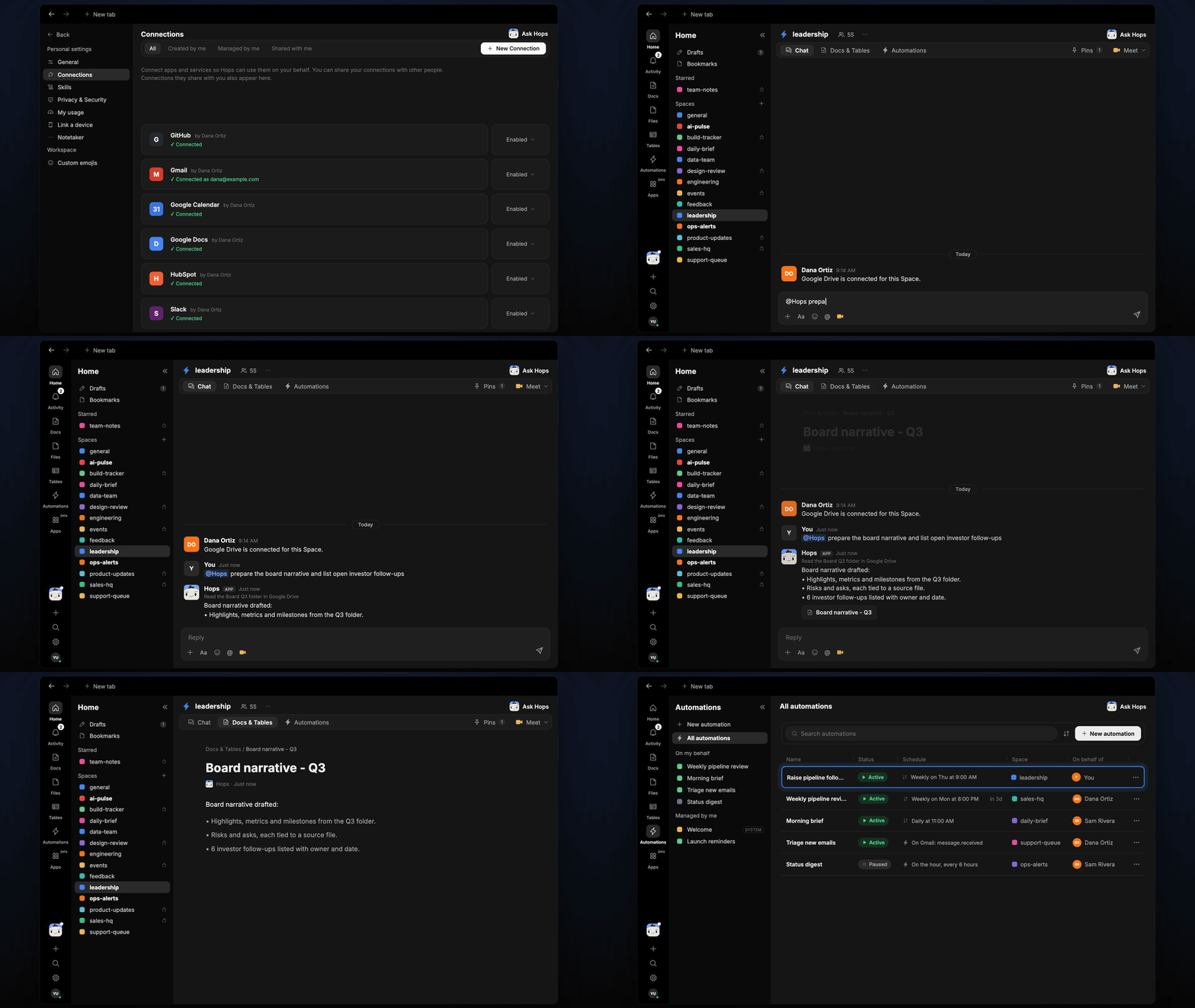
Copy a prompt into any chat with Hops, or mention `@Hops` in a Space.
```text theme={null}
Prepare the board narrative for the Q3 meeting using the Board Q3 folder, and list open investor follow-ups.
```
```text theme={null}
Which investors in our raise have not replied in the last 7 days? Draft a short nudge for each.
```
```text theme={null}
Draft the risks and asks section for the board deck. Cite the file behind every number.
```
```text theme={null}
What changed in our metrics since the last board deck? Compare it with the Q2 version.
```
```text theme={null}
Save the investor follow-up list as a doc with owner and next step for each firm.
```
Example reply:
> Board narrative drafted from the Board Q3 folder:
>
> * Highlights, metrics and milestones, each with a source file.
> * Risks and asks: 2 risks, 3 asks.
> * 6 investor follow-ups listed with owner and date. Northwind Capital and Globex Ventures have been quiet for 9 days.
## What you get
* **An answer in chat**, in the same thread, with the narrative and a source file for every number.
* **Drafted nudges** for investors who have gone quiet, ready for you to review and send.
* **A saved Doc, when you ask for one.** Say "save this as a doc" and Hops writes it to **Docs** in the Space.
## Connections needed
Connect the apps that hold your board material. Each card opens Connections in the app.
Data room and decks.
Metrics behind the board numbers.
Investor threads and last contact dates.
Board dates and investor meetings.
## Set it up
Connect the apps above in **Connections**.
See [Connections](/docs/connections/overview).
Create a **leadership** Space. Pin the board calendar, last deck and raise tracker in Space context.
See [Spaces](/docs/spaces/overview) and [Space context](/docs/spaces/space-context).
Give Hops these instructions:
```text theme={null}
You prepare board and fundraise material. Use the latest files in the board folder. Draft the narrative in our deck order: highlights, metrics, product, team, risks, asks. Every number cites a file. Keep a follow-up list of investors with last contact, next step and owner.
```
See [Build a skill](/docs/agents/build-a-skill).
Raise pipeline follow-ups: every Thursday at 9am, Hops lists investors with no reply in 7 days and drafts the nudge for each. It posts in the Space chat and saves the list to **Tables**.
See [Automation](/docs/spaces/automation).
Ask Hops in chat. Hops uses the skill and replies in the same thread.
## Related topics
- [Explore use cases](/use-cases/overview.md)
- [Founders & executives](/teams/founders-executives.md)
- [Board prep](/teams/finance/use-cases/board-prep.md)
- [Founder pipeline and partner meeting](/teams/vc-pe/use-cases/partner-meeting-prep.md)
- [Pre-call prep](/teams/sales/use-cases/pre-call-prep.md)
This documentation is built and hosted on [Mintlify](https://mintlify.com), a developer documentation platform.
## Ask Hops
Copy a prompt into any chat with Hops, or mention `@Hops` in a Space.
```text theme={null}
Prepare the board narrative for the Q3 meeting using the Board Q3 folder, and list open investor follow-ups.
```
```text theme={null}
Which investors in our raise have not replied in the last 7 days? Draft a short nudge for each.
```
```text theme={null}
Draft the risks and asks section for the board deck. Cite the file behind every number.
```
```text theme={null}
What changed in our metrics since the last board deck? Compare it with the Q2 version.
```
```text theme={null}
Save the investor follow-up list as a doc with owner and next step for each firm.
```
Example reply:
> Board narrative drafted from the Board Q3 folder:
>
> * Highlights, metrics and milestones, each with a source file.
> * Risks and asks: 2 risks, 3 asks.
> * 6 investor follow-ups listed with owner and date. Northwind Capital and Globex Ventures have been quiet for 9 days.
## What you get
* **An answer in chat**, in the same thread, with the narrative and a source file for every number.
* **Drafted nudges** for investors who have gone quiet, ready for you to review and send.
* **A saved Doc, when you ask for one.** Say "save this as a doc" and Hops writes it to **Docs** in the Space.
## Connections needed
Connect the apps that hold your board material. Each card opens Connections in the app.
Data room and decks.
Metrics behind the board numbers.
Investor threads and last contact dates.
Board dates and investor meetings.
## Set it up
Connect the apps above in **Connections**.
See [Connections](/docs/connections/overview).
Create a **leadership** Space. Pin the board calendar, last deck and raise tracker in Space context.
See [Spaces](/docs/spaces/overview) and [Space context](/docs/spaces/space-context).
Give Hops these instructions:
```text theme={null}
You prepare board and fundraise material. Use the latest files in the board folder. Draft the narrative in our deck order: highlights, metrics, product, team, risks, asks. Every number cites a file. Keep a follow-up list of investors with last contact, next step and owner.
```
See [Build a skill](/docs/agents/build-a-skill).
Raise pipeline follow-ups: every Thursday at 9am, Hops lists investors with no reply in 7 days and drafts the nudge for each. It posts in the Space chat and saves the list to **Tables**.
See [Automation](/docs/spaces/automation).
Ask Hops in chat. Hops uses the skill and replies in the same thread.
## Related topics
- [Explore use cases](/use-cases/overview.md)
- [Founders & executives](/teams/founders-executives.md)
- [Board prep](/teams/finance/use-cases/board-prep.md)
- [Founder pipeline and partner meeting](/teams/vc-pe/use-cases/partner-meeting-prep.md)
- [Pre-call prep](/teams/sales/use-cases/pre-call-prep.md)
This documentation is built and hosted on [Mintlify](https://mintlify.com), a developer documentation platform.