> ## Documentation Index
> Fetch the complete documentation index at: https://hopsdocs.mintlify.site/llms.txt
> Use this file to discover all available pages before exploring further.
# Monthly close
> Run the month-end close checklist and draft variance commentary.
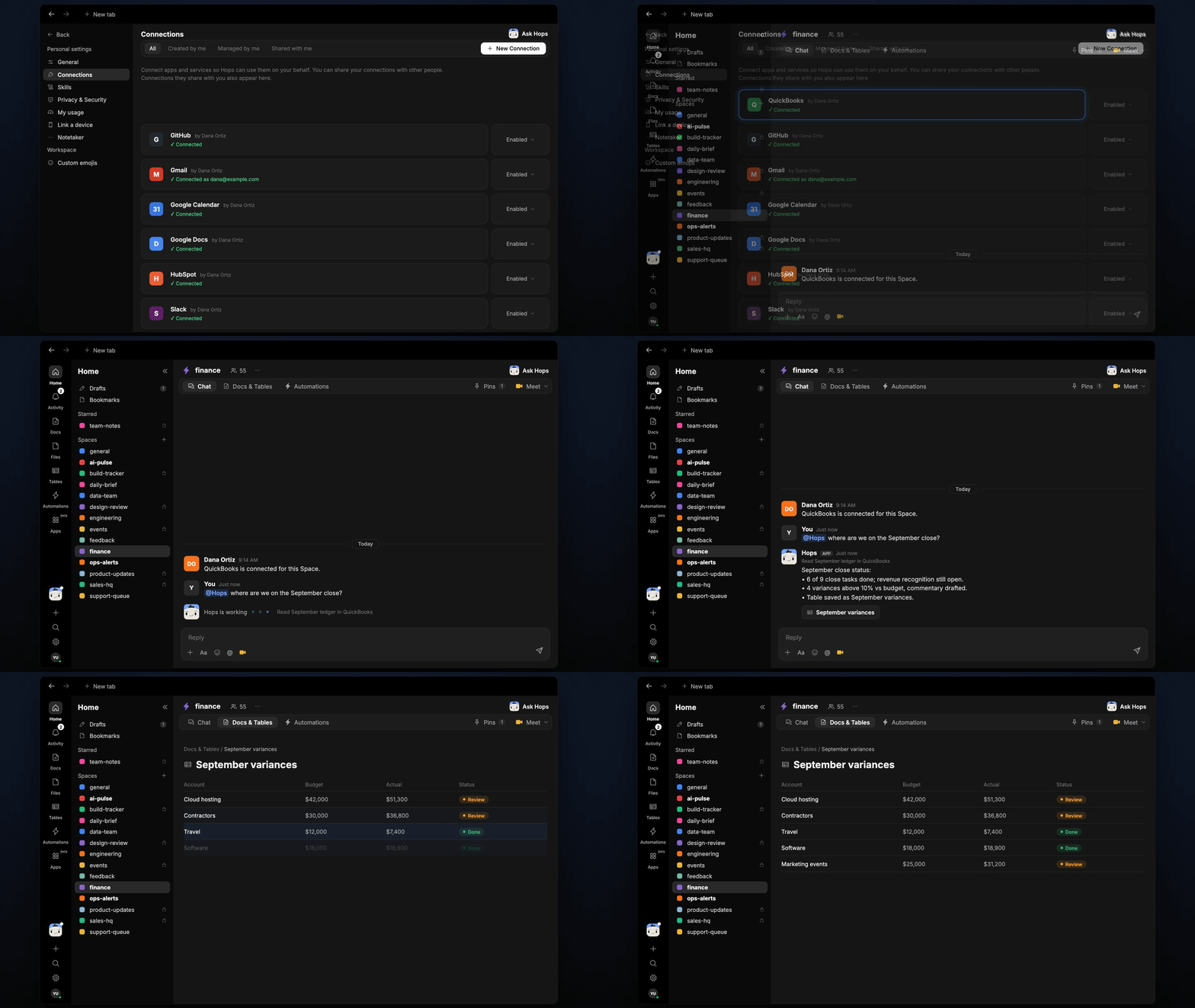
Month-end close is a long list of tasks with owners, and the variance commentary is written at the last minute. Hops tracks each close task, compares actuals to budget and drafts the commentary with the transactions behind each variance.
**How it runs:** Scheduled. An automation runs every weekday at 9am in the first week of the month, posts open close tasks and updates the close tracker Table. You can also ask Hops any time.
## What it does
* **Tracks every close task.** Hops keeps the checklist from Space context with an owner and status for each task.
* **Compares actuals to budget.** It reads the ledger in QuickBooks, Xero or NetSuite and the budget in Google Sheets.
* **Flags variances over 10%.** Each one gets a line of commentary citing the transactions behind it.
* **Lists what is still open.** Each morning it names the tasks that are late or blocked and who owns them.
* **Keeps the tracker current.** The close tracker Table updates on every run.
 ## Ask Hops
Copy a prompt into any chat with Hops, or mention `@Hops` in a Space.
```text theme={null}
Where are we on the September close?
```
```text theme={null}
Which close tasks are still open, and who owns them?
```
```text theme={null}
Compare September actuals to budget and flag variances over 10%.
```
```text theme={null}
Draft commentary for the software spend variance, citing the transactions.
```
```text theme={null}
What is blocking the close right now?
```
Example reply:
> September close, day 3:
>
> * 14 of 19 tasks done; bank reconciliation and accruals are open.
> * Software is 18% over budget, driven by 3 annual renewals.
> * Payroll liabilities are not reconciled; owner Priya Nair.
## What you get
* **An answer in chat**, in the same thread, whenever you ask.
* **A daily Slack post** during close with the open tasks, owners and blockers.
* **A close tracker Table** in **Tables** of the Space, updated each run.
* **A variance commentary Doc** in **Docs** with one line per flagged variance.
## Connections needed
Connect these apps. Each card opens Connections in the app.
The ledger (or Xero or NetSuite).
The budget to compare against.
Posts open close tasks to the finance channel.
## Set it up
Create a **finance** Space. Pin the close checklist and variance threshold in Space context.
See [Spaces](/docs/spaces/overview) and [Space context](/docs/spaces/space-context).
Connect the apps above in **Connections**.
See [Connections](/docs/connections/overview).
Give Hops these instructions:
```text theme={null}
You run the monthly close. Track each close task with owner and status. Compare actuals to budget, flag variances over 10% and draft one line of commentary for each, citing the transactions behind it.
```
See [Build a skill](/docs/agents/build-a-skill).
Every weekday at 9am in the first week of the month, Hops posts open close tasks to the finance channel, updates the close tracker Table and saves the commentary as a Doc.
See [Automation](/docs/spaces/automation).
## Related topics
- [Finance](/teams/finance.md)
- [Explore use cases](/use-cases/overview.md)
- [Skills](/agents/skills.md)
- [General](/settings/general.md)
- [Metrics reporting](/teams/founders-executives/use-cases/metrics-reporting.md)
This documentation is built and hosted on [Mintlify](https://mintlify.com), a developer documentation platform.
## Ask Hops
Copy a prompt into any chat with Hops, or mention `@Hops` in a Space.
```text theme={null}
Where are we on the September close?
```
```text theme={null}
Which close tasks are still open, and who owns them?
```
```text theme={null}
Compare September actuals to budget and flag variances over 10%.
```
```text theme={null}
Draft commentary for the software spend variance, citing the transactions.
```
```text theme={null}
What is blocking the close right now?
```
Example reply:
> September close, day 3:
>
> * 14 of 19 tasks done; bank reconciliation and accruals are open.
> * Software is 18% over budget, driven by 3 annual renewals.
> * Payroll liabilities are not reconciled; owner Priya Nair.
## What you get
* **An answer in chat**, in the same thread, whenever you ask.
* **A daily Slack post** during close with the open tasks, owners and blockers.
* **A close tracker Table** in **Tables** of the Space, updated each run.
* **A variance commentary Doc** in **Docs** with one line per flagged variance.
## Connections needed
Connect these apps. Each card opens Connections in the app.
The ledger (or Xero or NetSuite).
The budget to compare against.
Posts open close tasks to the finance channel.
## Set it up
Create a **finance** Space. Pin the close checklist and variance threshold in Space context.
See [Spaces](/docs/spaces/overview) and [Space context](/docs/spaces/space-context).
Connect the apps above in **Connections**.
See [Connections](/docs/connections/overview).
Give Hops these instructions:
```text theme={null}
You run the monthly close. Track each close task with owner and status. Compare actuals to budget, flag variances over 10% and draft one line of commentary for each, citing the transactions behind it.
```
See [Build a skill](/docs/agents/build-a-skill).
Every weekday at 9am in the first week of the month, Hops posts open close tasks to the finance channel, updates the close tracker Table and saves the commentary as a Doc.
See [Automation](/docs/spaces/automation).
## Related topics
- [Finance](/teams/finance.md)
- [Explore use cases](/use-cases/overview.md)
- [Skills](/agents/skills.md)
- [General](/settings/general.md)
- [Metrics reporting](/teams/founders-executives/use-cases/metrics-reporting.md)
This documentation is built and hosted on [Mintlify](https://mintlify.com), a developer documentation platform.