> ## Documentation Index
> Fetch the complete documentation index at: https://hopsdocs.mintlify.site/llms.txt
> Use this file to discover all available pages before exploring further.
# Invoice approvals
> Check incoming invoices against POs and route them for approval.
Vendor invoices arrive as PDFs and need checking against purchase orders before anyone pays. Hops matches each new invoice to its PO and routes it to the right approver.
**How it runs:** Triggered. An automation runs when a new invoice arrives in the AP inbox, and you can also ask Hops directly.
## What it does
* **Matches each invoice to its PO.** Hops reads the invoice from the AP inbox in Gmail and matches it by vendor and amount against POs and bills in QuickBooks or Xero.
* **Approves clean matches.** Invoices within 2% of the PO are marked ready to approve.
* **Flags overages.** Anything over the PO amount is flagged and routed using the approval matrix pinned in Space context.
* **Catches invoices with no PO.** These are listed separately and sent to the person who should decide.
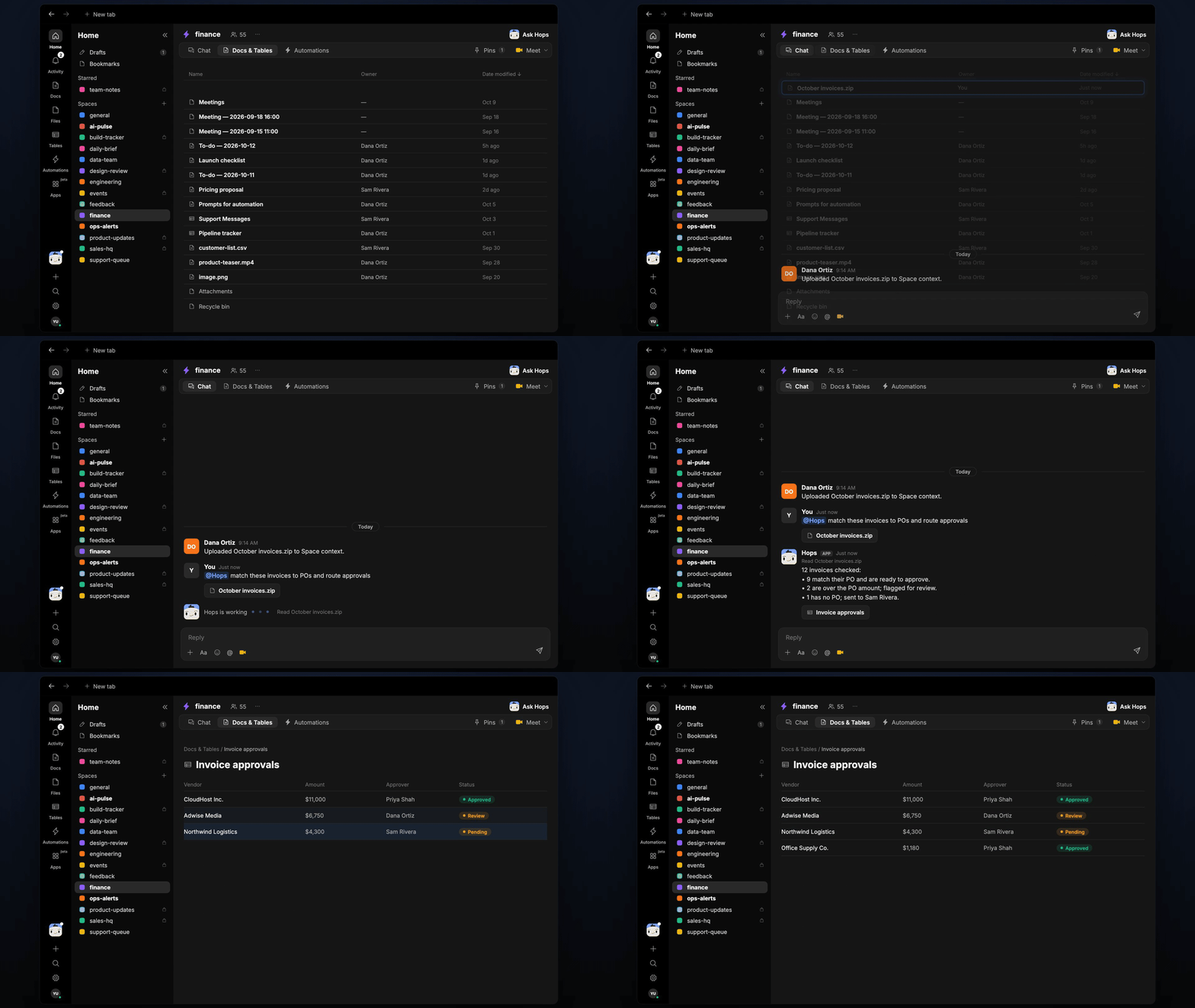
* **Handles batches.** Drop a zip of invoices into the Space and Hops checks them all in one pass.
 ## Ask Hops
Copy a prompt into any chat with Hops, or mention `@Hops` in a Space.
```text theme={null}
Match the October invoices to POs and route approvals.
```
```text theme={null}
Check the new Northwind invoice against PO 4471.
```
```text theme={null}
Which invoices in the AP inbox have no PO?
```
```text theme={null}
List invoices over their PO amount and who needs to approve them.
```
```text theme={null}
Summarize what is waiting on approval and how long it has been waiting.
```
Example reply:
> 12 invoices checked:
>
> * 9 match their PO and are ready to approve.
> * 2 are over the PO amount; flagged for review.
> * 1 has no PO; sent to Sam Rivera.
## What you get
* **An answer in chat**, in the same thread, whenever you ask.
* **A Slack post** to the approver when an invoice needs a decision, with the PO match and the reason.
* **An invoice log Table** in **Tables** of the Space with each invoice, its PO, status and approver.
* **An optional draft reply** to the vendor in Gmail for invoices that need a correction.
## Connections needed
Connect these apps. Each card opens Connections in the app.
POs and bills (or Xero).
Reads the invoice inbox and drafts vendor replies.
Routes approvals to the right person.
## Set it up
Create a **finance** Space. Pin the approval matrix and PO tracker in Space context.
See [Spaces](/docs/spaces/overview) and [Space context](/docs/spaces/space-context).
Connect the apps above in **Connections**.
See [Connections](/docs/connections/overview).
Give Hops these instructions:
```text theme={null}
You check vendor invoices. Match each to its PO by vendor and amount. Approve matches within 2%, flag anything over and route it using the approval matrix. List invoices with no PO.
```
See [Build a skill](/docs/agents/build-a-skill).
Run when a new invoice arrives in the AP inbox. Hops matches it, posts to the approver in Slack and adds a row to the invoice log Table.
See [Automation](/docs/spaces/automation).
## Related topics
- [Finance](/teams/finance.md)
- [Receivables and payables](/teams/finance/use-cases/ar-ap.md)
- [Social approvals](/teams/marketing/use-cases/social-approvals.md)
- [Copy review and approval](/teams/marketing/use-cases/brand-copywriting.md)
- [Billing](/settings/billing.md)
This documentation is built and hosted on [Mintlify](https://mintlify.com), a developer documentation platform.
## Ask Hops
Copy a prompt into any chat with Hops, or mention `@Hops` in a Space.
```text theme={null}
Match the October invoices to POs and route approvals.
```
```text theme={null}
Check the new Northwind invoice against PO 4471.
```
```text theme={null}
Which invoices in the AP inbox have no PO?
```
```text theme={null}
List invoices over their PO amount and who needs to approve them.
```
```text theme={null}
Summarize what is waiting on approval and how long it has been waiting.
```
Example reply:
> 12 invoices checked:
>
> * 9 match their PO and are ready to approve.
> * 2 are over the PO amount; flagged for review.
> * 1 has no PO; sent to Sam Rivera.
## What you get
* **An answer in chat**, in the same thread, whenever you ask.
* **A Slack post** to the approver when an invoice needs a decision, with the PO match and the reason.
* **An invoice log Table** in **Tables** of the Space with each invoice, its PO, status and approver.
* **An optional draft reply** to the vendor in Gmail for invoices that need a correction.
## Connections needed
Connect these apps. Each card opens Connections in the app.
POs and bills (or Xero).
Reads the invoice inbox and drafts vendor replies.
Routes approvals to the right person.
## Set it up
Create a **finance** Space. Pin the approval matrix and PO tracker in Space context.
See [Spaces](/docs/spaces/overview) and [Space context](/docs/spaces/space-context).
Connect the apps above in **Connections**.
See [Connections](/docs/connections/overview).
Give Hops these instructions:
```text theme={null}
You check vendor invoices. Match each to its PO by vendor and amount. Approve matches within 2%, flag anything over and route it using the approval matrix. List invoices with no PO.
```
See [Build a skill](/docs/agents/build-a-skill).
Run when a new invoice arrives in the AP inbox. Hops matches it, posts to the approver in Slack and adds a row to the invoice log Table.
See [Automation](/docs/spaces/automation).
## Related topics
- [Finance](/teams/finance.md)
- [Receivables and payables](/teams/finance/use-cases/ar-ap.md)
- [Social approvals](/teams/marketing/use-cases/social-approvals.md)
- [Copy review and approval](/teams/marketing/use-cases/brand-copywriting.md)
- [Billing](/settings/billing.md)
This documentation is built and hosted on [Mintlify](https://mintlify.com), a developer documentation platform.