> ## Documentation Index
> Fetch the complete documentation index at: https://hopsdocs.mintlify.site/llms.txt
> Use this file to discover all available pages before exploring further.
# Board prep
> Populate the board deck financial sections from connected data.
Board decks need current numbers, prior periods and plan in a consistent layout, and the data sits in several tools. Hops pulls each metric from your accounting tool and model, fills the financial sections of the deck structure and flags anything missing instead of inventing it.
**How it runs:** Scheduled. An automation runs three weeks before each board meeting, posts a checklist of every metric needed and its source, and saves it as a Doc. You can also ask Hops any time.
## What it does
* **Follows your deck structure.** Hops reads the outline pinned in Space context and fills each financial section in that order.
* **Pulls current, prior period and plan.** For every metric it reads the ledger in QuickBooks, Xero or NetSuite and the plan in Google Sheets or Excel.
* **Explains material variances.** Any metric that moves past the threshold gets a short note on what drove it.
* **Never invents a number.** If a metric has no source or is stale, Hops flags it as missing rather than estimating.
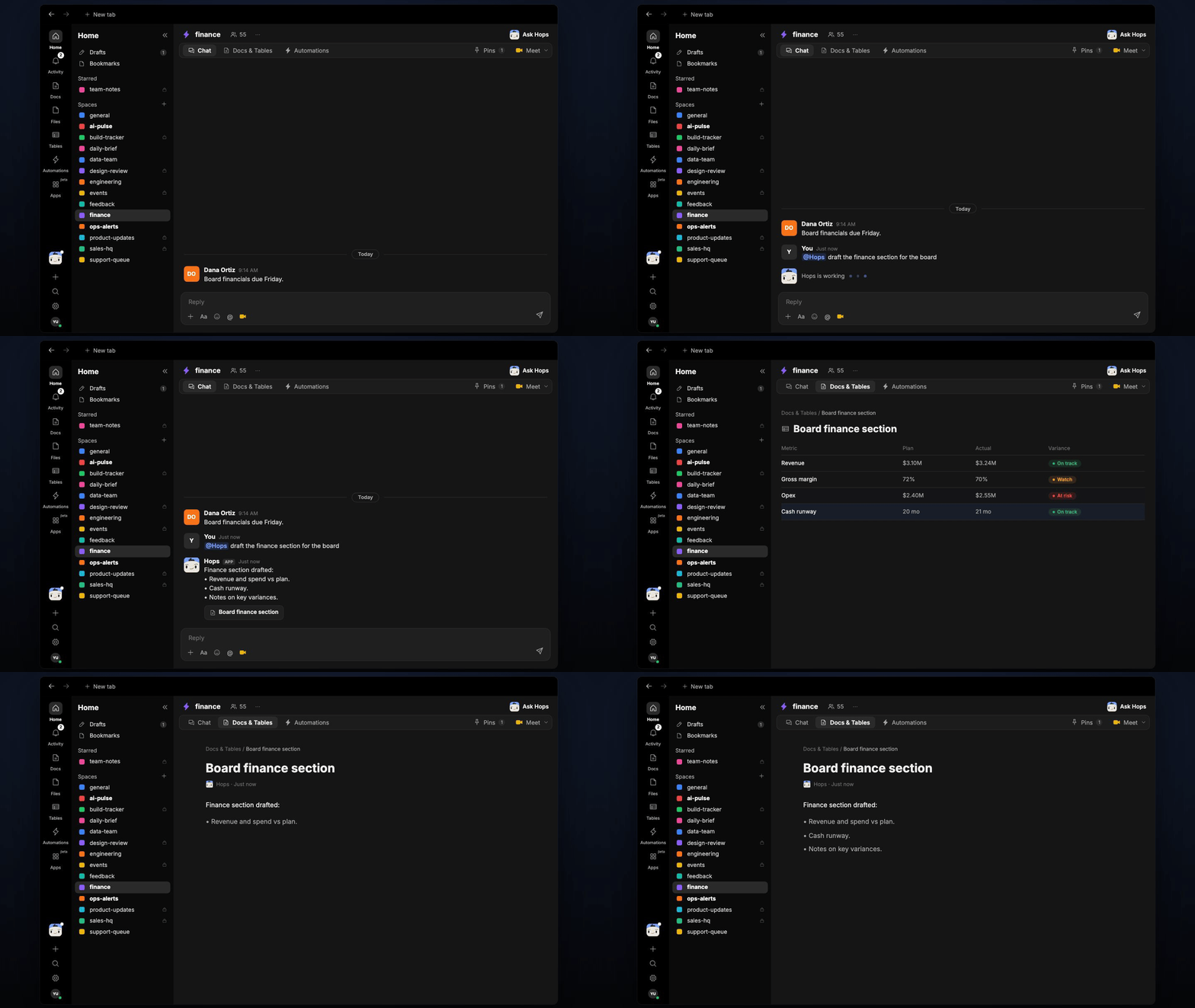
* **Builds the numbers as a table first.** Figures go into a Table so the deck and the commentary tie back to one source.
 ## Ask Hops
Copy a prompt into any chat with Hops, or mention `@Hops` in a Space.
```text theme={null}
Draft the finance section for the Q3 board deck.
```
```text theme={null}
Build the revenue, spend and cash table vs plan for September.
```
```text theme={null}
Which metrics for the board deck are still missing a source?
```
```text theme={null}
Write variance notes for every line more than 10% off plan.
```
```text theme={null}
Summarize cash runway and how it changed since the last board meeting.
```
Example reply:
> Finance section drafted:
>
> * Revenue \$3.2M, 4% above plan; spend 2% under plan.
> * Cash runway 21 months, up from 19.
> * Missing: deferred revenue schedule, no source found.
## What you get
* **An answer in chat**, in the same thread, with the drafted section.
* **A kickoff checklist in Slack or the Space chat** three weeks before each board meeting, listing every metric and its source.
* **A saved finance Doc** in **Docs** of the Space with the drafted sections and variance notes.
* **A numbers Table** in **Tables** with current, prior period and plan for each metric.
## Connections needed
Connect these apps. Each card opens Connections in the app.
Actuals from the ledger (or Xero or NetSuite).
Plan and the financial model (or Excel).
The deck and prior board materials (or Notion).
## Set it up
Create one Board Prep Space per cycle. Pin the deck outline and the financial model in Space context.
See [Spaces](/docs/spaces/overview) and [Space context](/docs/spaces/space-context).
Connect the apps above in **Connections**.
See [Connections](/docs/connections/overview).
Give Hops these instructions:
```text theme={null}
You populate the board deck's financial sections. Use the deck structure in the Space Context document. For each metric, pull the current value, the prior period, and the plan. Note any material variance. Never invent a number. If a metric is missing, flag it.
```
See [Build a skill](/docs/agents/build-a-skill).
Three weeks before each board meeting, Hops posts a checklist of every metric needed and its current source, and saves it as a Doc.
See [Automation](/docs/spaces/automation).
## Related topics
- [Skills](/agents/skills.md)
- [Explore use cases](/use-cases/overview.md)
- [Finance](/teams/finance.md)
- [Weekly team update](/teams/founders-executives/use-cases/weekly-update.md)
- [Board meeting and fundraise prep](/teams/founders-executives/use-cases/board-deck-prep.md)
This documentation is built and hosted on [Mintlify](https://mintlify.com), a developer documentation platform.
## Ask Hops
Copy a prompt into any chat with Hops, or mention `@Hops` in a Space.
```text theme={null}
Draft the finance section for the Q3 board deck.
```
```text theme={null}
Build the revenue, spend and cash table vs plan for September.
```
```text theme={null}
Which metrics for the board deck are still missing a source?
```
```text theme={null}
Write variance notes for every line more than 10% off plan.
```
```text theme={null}
Summarize cash runway and how it changed since the last board meeting.
```
Example reply:
> Finance section drafted:
>
> * Revenue \$3.2M, 4% above plan; spend 2% under plan.
> * Cash runway 21 months, up from 19.
> * Missing: deferred revenue schedule, no source found.
## What you get
* **An answer in chat**, in the same thread, with the drafted section.
* **A kickoff checklist in Slack or the Space chat** three weeks before each board meeting, listing every metric and its source.
* **A saved finance Doc** in **Docs** of the Space with the drafted sections and variance notes.
* **A numbers Table** in **Tables** with current, prior period and plan for each metric.
## Connections needed
Connect these apps. Each card opens Connections in the app.
Actuals from the ledger (or Xero or NetSuite).
Plan and the financial model (or Excel).
The deck and prior board materials (or Notion).
## Set it up
Create one Board Prep Space per cycle. Pin the deck outline and the financial model in Space context.
See [Spaces](/docs/spaces/overview) and [Space context](/docs/spaces/space-context).
Connect the apps above in **Connections**.
See [Connections](/docs/connections/overview).
Give Hops these instructions:
```text theme={null}
You populate the board deck's financial sections. Use the deck structure in the Space Context document. For each metric, pull the current value, the prior period, and the plan. Note any material variance. Never invent a number. If a metric is missing, flag it.
```
See [Build a skill](/docs/agents/build-a-skill).
Three weeks before each board meeting, Hops posts a checklist of every metric needed and its current source, and saves it as a Doc.
See [Automation](/docs/spaces/automation).
## Related topics
- [Skills](/agents/skills.md)
- [Explore use cases](/use-cases/overview.md)
- [Finance](/teams/finance.md)
- [Weekly team update](/teams/founders-executives/use-cases/weekly-update.md)
- [Board meeting and fundraise prep](/teams/founders-executives/use-cases/board-deck-prep.md)
This documentation is built and hosted on [Mintlify](https://mintlify.com), a developer documentation platform.