> ## Documentation Index
> Fetch the complete documentation index at: https://hopsdocs.mintlify.site/llms.txt
> Use this file to discover all available pages before exploring further.
# Receivables and payables
> Track who owes you, who you owe, and chase what is overdue.
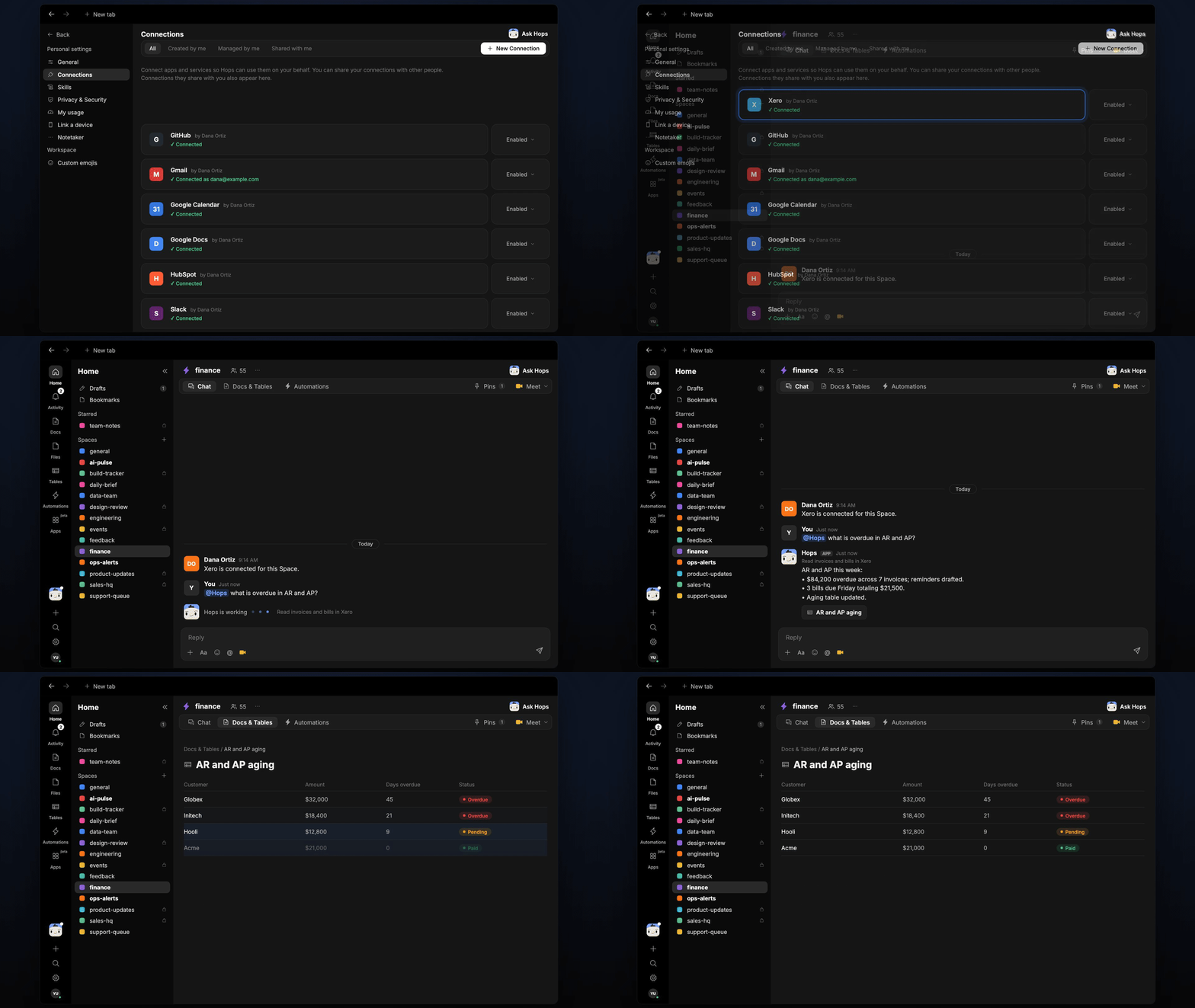
Overdue invoices hurt cash, and bills due next week are easy to miss. Hops reads receivables and payables in your accounting tool, lists what is overdue by age and amount, and drafts the reminder emails for you to approve.
**How it runs:** Scheduled. An automation runs every Monday at 9am, posts the aging summary and drafted reminders and updates the aging Table. You can also ask Hops any time.
## What it does
* **Builds an aging view of receivables.** Hops reads open invoices in Xero, QuickBooks or NetSuite and groups them by age bucket, customer and amount.
* **Lists bills due soon.** It pulls payables due in the next 7 days with vendor, amount and due date.
* **Drafts polite reminders.** Each overdue invoice gets a reminder email draft in Gmail, written for that customer. Nothing is sent without your approval.
* **Flags the biggest exposures first.** Customers with large or long-overdue balances are ranked at the top so you chase the right ones.
* **Keeps one aging table current.** Each run updates the same Table, so you can see what changed since last week.
 ## Ask Hops
Copy a prompt into any chat with Hops, or mention `@Hops` in a Space.
```text theme={null}
What is overdue in AR and AP this week?
```
```text theme={null}
List Acme and Globex invoices more than 30 days overdue and draft a reminder for each.
```
```text theme={null}
Which bills are due before Friday, and what is the total?
```
```text theme={null}
Update the aging table and rank customers by overdue amount.
```
```text theme={null}
Draft a firm second reminder for Northwind's invoice that is 45 days late.
```
Example reply:
> AR and AP this week:
>
> * \$84,200 overdue across 7 invoices; reminders drafted.
> * 3 bills due Friday totaling \$21,500.
> * Aging table updated.
## What you get
* **An answer in chat**, in the same thread, whenever you ask.
* **A weekly Slack post** in the finance channel with the aging summary and a link to the drafted reminders.
* **An updated aging Table** in **Tables** of the Space, refreshed on every run.
* **Reminder email drafts** in Gmail, ready for you to review and send.
## Connections needed
Connect these apps. Each card opens Connections in the app.
Invoices, bills and aging (or QuickBooks or NetSuite).
Drafts reminder emails for approval.
Posts the weekly summary to the finance channel.
## Set it up
Create a **finance** Space. Pin your collections policy in Space context.
See [Spaces](/docs/spaces/overview) and [Space context](/docs/spaces/space-context).
Connect the apps above in **Connections**.
See [Connections](/docs/connections/overview).
Give Hops these instructions:
```text theme={null}
You manage AR and AP. List overdue invoices by age and amount and draft a polite reminder for each. List bills due in the next 7 days. Never send without approval.
```
See [Build a skill](/docs/agents/build-a-skill).
Every Monday at 9am Hops posts the aging summary and drafted reminders to the finance channel and updates the aging Table.
See [Automation](/docs/spaces/automation).
## Related topics
- [Finance](/teams/finance.md)
- [Cash and payroll check](/teams/finance/use-cases/cash-payroll.md)
This documentation is built and hosted on [Mintlify](https://mintlify.com), a developer documentation platform.
## Ask Hops
Copy a prompt into any chat with Hops, or mention `@Hops` in a Space.
```text theme={null}
What is overdue in AR and AP this week?
```
```text theme={null}
List Acme and Globex invoices more than 30 days overdue and draft a reminder for each.
```
```text theme={null}
Which bills are due before Friday, and what is the total?
```
```text theme={null}
Update the aging table and rank customers by overdue amount.
```
```text theme={null}
Draft a firm second reminder for Northwind's invoice that is 45 days late.
```
Example reply:
> AR and AP this week:
>
> * \$84,200 overdue across 7 invoices; reminders drafted.
> * 3 bills due Friday totaling \$21,500.
> * Aging table updated.
## What you get
* **An answer in chat**, in the same thread, whenever you ask.
* **A weekly Slack post** in the finance channel with the aging summary and a link to the drafted reminders.
* **An updated aging Table** in **Tables** of the Space, refreshed on every run.
* **Reminder email drafts** in Gmail, ready for you to review and send.
## Connections needed
Connect these apps. Each card opens Connections in the app.
Invoices, bills and aging (or QuickBooks or NetSuite).
Drafts reminder emails for approval.
Posts the weekly summary to the finance channel.
## Set it up
Create a **finance** Space. Pin your collections policy in Space context.
See [Spaces](/docs/spaces/overview) and [Space context](/docs/spaces/space-context).
Connect the apps above in **Connections**.
See [Connections](/docs/connections/overview).
Give Hops these instructions:
```text theme={null}
You manage AR and AP. List overdue invoices by age and amount and draft a polite reminder for each. List bills due in the next 7 days. Never send without approval.
```
See [Build a skill](/docs/agents/build-a-skill).
Every Monday at 9am Hops posts the aging summary and drafted reminders to the finance channel and updates the aging Table.
See [Automation](/docs/spaces/automation).
## Related topics
- [Finance](/teams/finance.md)
- [Cash and payroll check](/teams/finance/use-cases/cash-payroll.md)
This documentation is built and hosted on [Mintlify](https://mintlify.com), a developer documentation platform.