> ## Documentation Index
> Fetch the complete documentation index at: https://hopsdocs.mintlify.site/llms.txt
> Use this file to discover all available pages before exploring further.
# Docs
> Rich-text documents that live inside your Spaces and become shared context for Hops.
Docs are rich-text pages you and Hops write together. Every doc lives inside a Space, so anything you capture — a brief, meeting notes, a research summary, a spec — becomes shared context Hops can draw from.
 Docs is in **Beta**. Expect rough edges, and your feedback shapes where it goes next.
Open **Docs** from the left sidebar to browse every doc you have access to.
## The Docs view
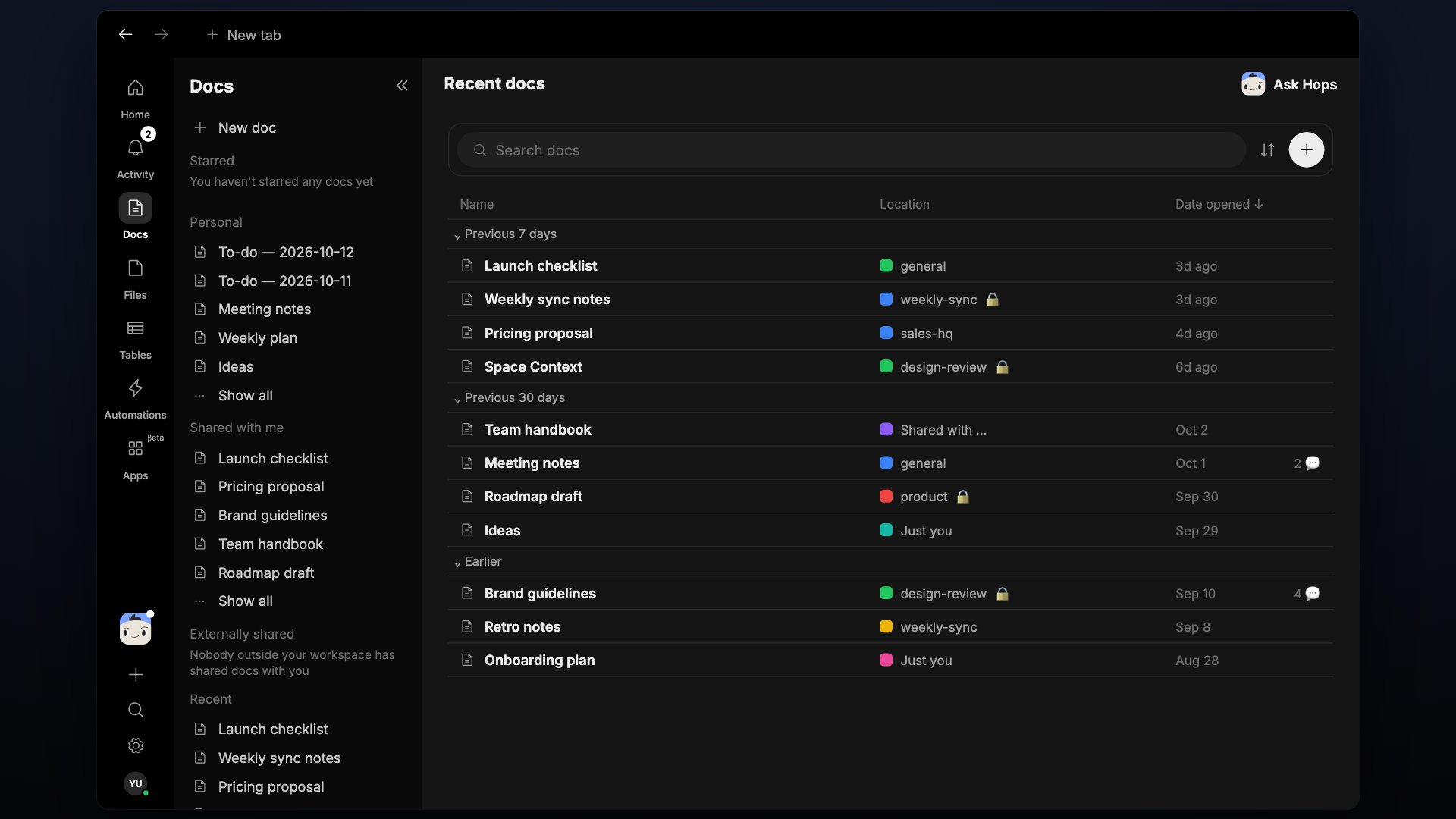
Docs are grouped in five sections:
* **Starred** — docs you've marked as favorites.
* **Personal** — docs in your personal space.
* **Shared with me** — docs someone else has shared with you.
* **Externally shared** — docs shared with people outside your workspace.
* **Recent** — docs you've opened most recently.
Each row in **Recent** shows the doc's **Name**, its **Location** (the Space it belongs to), and the **Date opened**.
## Create a doc
* Click **New doc** at the top of the Docs page.
* Click the global **+** button at the bottom of the left sidebar and choose **Document**.
* Ask Hops to write one — the result is saved as a doc in the current Space.
## The doc editor
Every doc opens in a full-page editor with a formatting toolbar:
| Control | What it does |
| - | - |
| Undo / Redo | Step your changes backward or forward |
| Headings | Convert a line to H1, H2, or H3 |
| Lists | Bulleted, numbered, and checklist |
| Quote, Code block | Block formatting |
| Bold, Italic, Strikethrough, Underline, Inline code, Highlight, Link | Inline formatting |
| More | Alignment, horizontal rule, table, image |
Docs support Markdown-style shortcuts. Type `#` for a heading, `- ` for a list, or ` ``` ` to start a code block.
## Star, share, and organize
* **Star** a doc to keep it in your Starred list.
* **Share** a doc so it becomes part of the Space's context.
* **Move** a doc between Spaces from the `...` menu.
## Generate a doc with Hops
Hops can create a doc for you. Ask in chat and the doc is written, saved into the current Space, and opened for review.
```
@Hops turn this thread into a launch brief and save it as a doc
@Hops draft a competitor teardown doc from what we discussed
@Hops write a v1 landing page doc using our Space Context
```
The generated doc lives in the Space's **Docs** tab immediately — edit it, share it, or hand it back to Hops for the next revision.
## Edit alongside Hops
Docs are collaborative. You and Hops can edit the same doc — Hops applies changes as tracked edits you can accept or refine.
* Highlight a section and ask Hops to **rewrite**, **tighten**, or **expand** it.
* Ask for a **summary** of a long doc at the top.
* Ask Hops to **extract action items** into a checklist.
## Mention people, Hops, and other artifacts
Type `@` inside a doc to reference:
* **Teammates** — pings them and gives them context.
* **Hops** — kicks off an inline task; the response appears in the doc.
* **Other artifacts** — link to another doc, a sheet, or a file for cross-context work.
## History and version control
Every change to a doc is tracked. Open the doc's `...` menu to view **history**, see who edited what, and restore an earlier version if you need to roll back.
## Export and share externally
From the doc's `...` menu you can:
* **Copy link** to share with anyone with access to the Space.
* **Export as Markdown** or **PDF** to send outside Hops.
* **Duplicate** into another Space to reuse as a template.
## Docs as Hops context
Anything you write in a doc is available to Hops in that Space. Ask Hops to summarize a doc, extract action items, or draft the next version — it can read and edit docs directly.
## Related
* [Tables](/docs/artifacts/tables)
* [Files](/docs/artifacts/files)
* [Space Context](/docs/spaces/space-context)
## Related topics
- [Welcome](/welcome.md)
- [Space Context document](/spaces/space-context.md)
- [Response drafting](/teams/support/use-cases/response-drafting.md)
- [Job description draft](/teams/hr-people-ops/use-cases/job-description-draft.md)
- [Artifacts overview](/artifacts/overview.md)
This documentation is built and hosted on [Mintlify](https://mintlify.com), a developer documentation platform.
Docs is in **Beta**. Expect rough edges, and your feedback shapes where it goes next.
Open **Docs** from the left sidebar to browse every doc you have access to.
## The Docs view
Docs are grouped in five sections:
* **Starred** — docs you've marked as favorites.
* **Personal** — docs in your personal space.
* **Shared with me** — docs someone else has shared with you.
* **Externally shared** — docs shared with people outside your workspace.
* **Recent** — docs you've opened most recently.
Each row in **Recent** shows the doc's **Name**, its **Location** (the Space it belongs to), and the **Date opened**.
## Create a doc
* Click **New doc** at the top of the Docs page.
* Click the global **+** button at the bottom of the left sidebar and choose **Document**.
* Ask Hops to write one — the result is saved as a doc in the current Space.
## The doc editor
Every doc opens in a full-page editor with a formatting toolbar:
| Control | What it does |
| - | - |
| Undo / Redo | Step your changes backward or forward |
| Headings | Convert a line to H1, H2, or H3 |
| Lists | Bulleted, numbered, and checklist |
| Quote, Code block | Block formatting |
| Bold, Italic, Strikethrough, Underline, Inline code, Highlight, Link | Inline formatting |
| More | Alignment, horizontal rule, table, image |
Docs support Markdown-style shortcuts. Type `#` for a heading, `- ` for a list, or ` ``` ` to start a code block.
## Star, share, and organize
* **Star** a doc to keep it in your Starred list.
* **Share** a doc so it becomes part of the Space's context.
* **Move** a doc between Spaces from the `...` menu.
## Generate a doc with Hops
Hops can create a doc for you. Ask in chat and the doc is written, saved into the current Space, and opened for review.
```
@Hops turn this thread into a launch brief and save it as a doc
@Hops draft a competitor teardown doc from what we discussed
@Hops write a v1 landing page doc using our Space Context
```
The generated doc lives in the Space's **Docs** tab immediately — edit it, share it, or hand it back to Hops for the next revision.
## Edit alongside Hops
Docs are collaborative. You and Hops can edit the same doc — Hops applies changes as tracked edits you can accept or refine.
* Highlight a section and ask Hops to **rewrite**, **tighten**, or **expand** it.
* Ask for a **summary** of a long doc at the top.
* Ask Hops to **extract action items** into a checklist.
## Mention people, Hops, and other artifacts
Type `@` inside a doc to reference:
* **Teammates** — pings them and gives them context.
* **Hops** — kicks off an inline task; the response appears in the doc.
* **Other artifacts** — link to another doc, a sheet, or a file for cross-context work.
## History and version control
Every change to a doc is tracked. Open the doc's `...` menu to view **history**, see who edited what, and restore an earlier version if you need to roll back.
## Export and share externally
From the doc's `...` menu you can:
* **Copy link** to share with anyone with access to the Space.
* **Export as Markdown** or **PDF** to send outside Hops.
* **Duplicate** into another Space to reuse as a template.
## Docs as Hops context
Anything you write in a doc is available to Hops in that Space. Ask Hops to summarize a doc, extract action items, or draft the next version — it can read and edit docs directly.
## Related
* [Tables](/docs/artifacts/tables)
* [Files](/docs/artifacts/files)
* [Space Context](/docs/spaces/space-context)
## Related topics
- [Welcome](/welcome.md)
- [Space Context document](/spaces/space-context.md)
- [Response drafting](/teams/support/use-cases/response-drafting.md)
- [Job description draft](/teams/hr-people-ops/use-cases/job-description-draft.md)
- [Artifacts overview](/artifacts/overview.md)
This documentation is built and hosted on [Mintlify](https://mintlify.com), a developer documentation platform.