> ## Documentation Index
> Fetch the complete documentation index at: https://hopsdocs.mintlify.site/llms.txt
> Use this file to discover all available pages before exploring further.
# Apps
> Build small internal tools your team can open and use inside Hops.
Beta Apps is in beta. Expect rough edges.
Apps are small tools that live in your workspace, such as a help desk, a support inbox, or a lightweight CRM. Open **Apps** from the left sidebar to see them.
 ## The Apps page
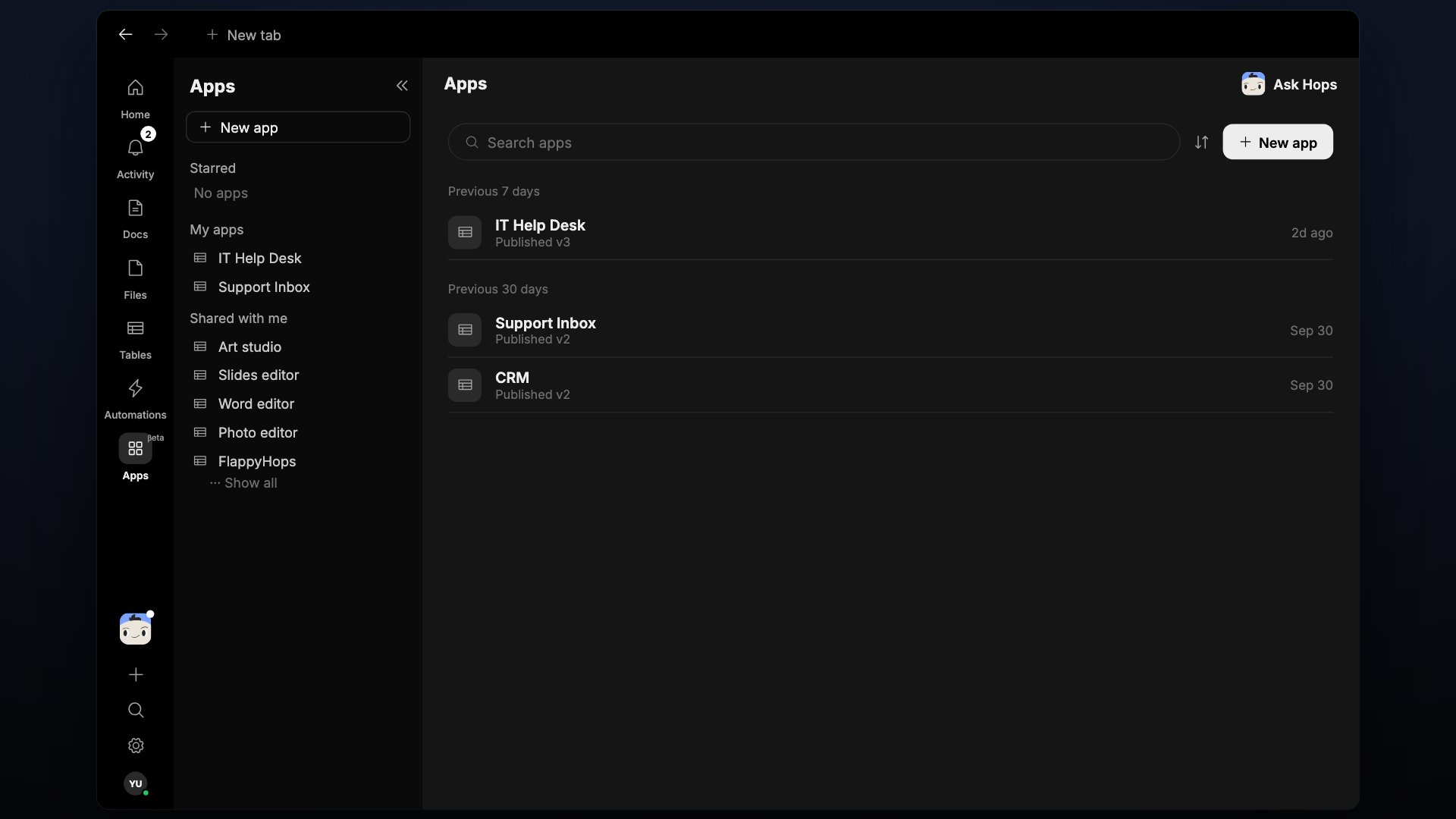
Apps are grouped in three sections:
* **Starred** — apps you've marked as favorites.
* **My apps** — apps you created.
* **Shared with me** — apps someone else has shared with you.
Within a section, apps are grouped by when you last used them, for example **Previous 7 days** and **Previous 30 days**.
Each app shows its name and its published version, for example **Published v3**.
## Create an app
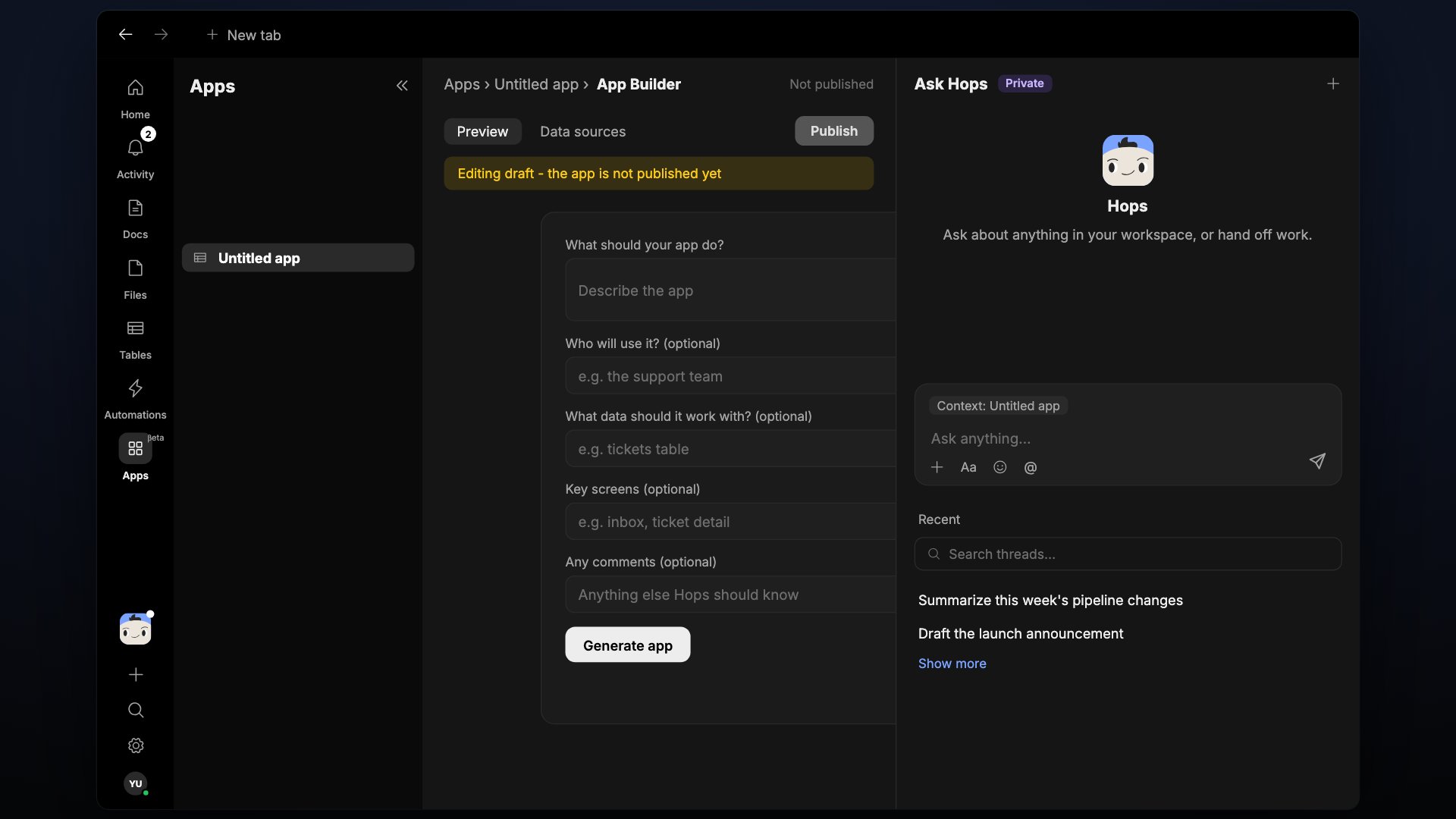
Click **New app** at the top of the page. Hops opens the App Builder with an "Untitled app".
Fill in the form and click **Generate app**:
* **What should your app do?**
* **Who will use it?** (optional)
* **What data should it work with?** (optional)
* **Key screens** (optional)
* **Any comments** (optional)
Use the **Ask Hops** panel on the right to change the app. Use **Preview** to try it and **Data sources** to see what it reads.
A banner reads "Editing draft - the app is not published yet" until you click **Publish**.
## The Apps page
Apps are grouped in three sections:
* **Starred** — apps you've marked as favorites.
* **My apps** — apps you created.
* **Shared with me** — apps someone else has shared with you.
Within a section, apps are grouped by when you last used them, for example **Previous 7 days** and **Previous 30 days**.
Each app shows its name and its published version, for example **Published v3**.
## Create an app
Click **New app** at the top of the page. Hops opens the App Builder with an "Untitled app".
Fill in the form and click **Generate app**:
* **What should your app do?**
* **Who will use it?** (optional)
* **What data should it work with?** (optional)
* **Key screens** (optional)
* **Any comments** (optional)
Use the **Ask Hops** panel on the right to change the app. Use **Preview** to try it and **Data sources** to see what it reads.
A banner reads "Editing draft - the app is not published yet" until you click **Publish**.
 The **...** menu next to the app name lets you **Star**, **Copy link**, or **Delete** the app.
## Versions
Apps are published in versions. The list shows the version that is currently live, so you can tell at a glance whether an app has been updated.
## Related
* [Docs](/docs/artifacts/docs)
* [Tables](/docs/artifacts/tables)
* [Automations](/docs/spaces/automation)
## Related topics
- [Connect an app](/connections/connect-an-app.md)
- [Core concepts](/getting-started/core-concepts.md)
- [General](/settings/general.md)
- [Social approvals](/teams/marketing/use-cases/social-approvals.md)
- [Applicant ranking](/teams/hr-people-ops/use-cases/applicant-ranking.md)
This documentation is built and hosted on [Mintlify](https://mintlify.com), a developer documentation platform.
The **...** menu next to the app name lets you **Star**, **Copy link**, or **Delete** the app.
## Versions
Apps are published in versions. The list shows the version that is currently live, so you can tell at a glance whether an app has been updated.
## Related
* [Docs](/docs/artifacts/docs)
* [Tables](/docs/artifacts/tables)
* [Automations](/docs/spaces/automation)
## Related topics
- [Connect an app](/connections/connect-an-app.md)
- [Core concepts](/getting-started/core-concepts.md)
- [General](/settings/general.md)
- [Social approvals](/teams/marketing/use-cases/social-approvals.md)
- [Applicant ranking](/teams/hr-people-ops/use-cases/applicant-ranking.md)
This documentation is built and hosted on [Mintlify](https://mintlify.com), a developer documentation platform.